Most manufacturing facilities operating on reactive maintenance lose 20–30% of their available production capacity to unplanned stoppages — not because preventive maintenance is complicated, but because no one has ever built the foundation. Setting up a preventive maintenance program from scratch doesn't require a massive budget or a six-month rollout. With the right structure and a platform like OxMaint, most plants can go from zero to a functioning PM program within 30 days. This guide walks you through every step — asset inventory, PM task libraries, scheduling logic, and CMMS configuration — so your team can stop fighting fires and start preventing them. Sign Up Free and begin building your program today with OxMaint's guided setup workflow.
Preventive Maintenance Platform
Build Your PM Program in 30 Days — Not 6 Months.
OxMaint gives your team a structured CMMS to set up asset registers, PM task libraries, and automated schedules from day one.
Why Most PM Programs Fail Before They Start
The Three Gaps That Keep Facilities Reactive
01
No Asset Register
You can't maintain what you haven't catalogued. Without a structured asset list tied to criticality, every PM effort is guesswork — resources land on the wrong equipment at the wrong time.
02
No Task Standardization
When PM tasks exist only in technician memory or scattered spreadsheets, compliance collapses the moment a team member leaves. Standardized task libraries are non-negotiable for repeatability.
03
No Scheduling Infrastructure
Manual PM calendars break under production pressure. Intervals slip, tasks get skipped, and there's no visibility into what's overdue. Automated scheduling inside a CMMS solves this permanently.
30-Day PM Program Setup: Week-by-Week Roadmap
A Structured Implementation Plan for Manufacturing Teams
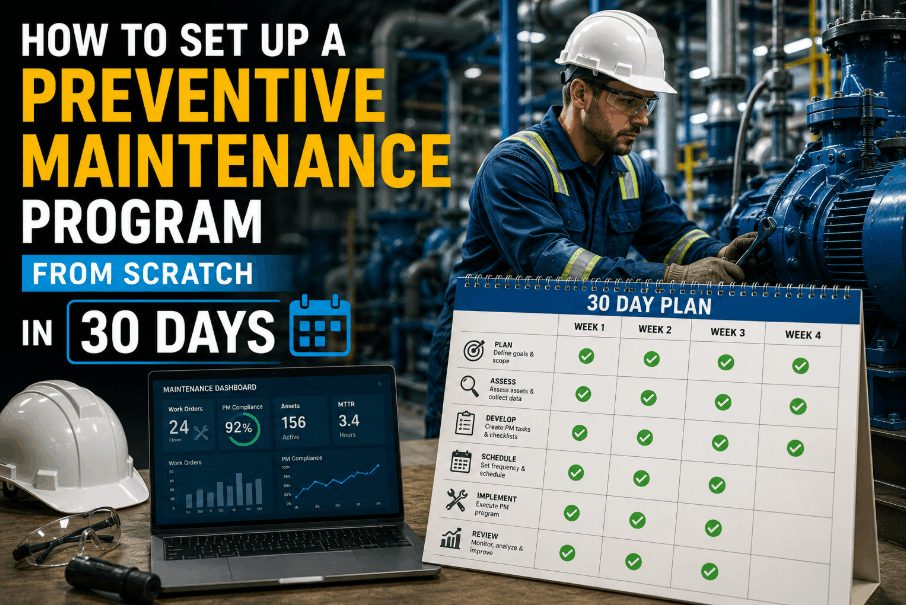
Week 1
Asset Inventory and Criticality Ranking
Build your asset register from scratch. Walk the plant floor and document every piece of production equipment — name, location, model, serial number, and installation date. Then assign a criticality score (High / Medium / Low) based on failure impact on production output. This single step defines where your PM effort goes first. OxMaint's asset module lets you structure this hierarchy in hours, not days.
Book a Demo to see how the asset setup workflow is structured.
Week 2
PM Task Library Creation
For each critical and medium-criticality asset, define the maintenance tasks required — inspections, lubrication, filter changes, calibrations, and functional tests. Document task frequency, estimated duration, required tools, and skill level. OxMaint's PM task library stores these templates and links them directly to asset records, so every work order is auto-populated with the correct instructions and parts list.
Sign Up Free to start building your task library using OxMaint's template-driven setup.
Week 3
Scheduling Logic and Trigger Configuration
Configure your PM triggers — calendar-based (every 30/60/90 days), meter-based (every X operating hours), or condition-based (after anomaly detection). Set escalation rules so overdue tasks surface automatically to supervisors. Load your initial schedule into OxMaint, assign technicians, and run a one-week dry-run to test compliance and workload balance before going live.
Book a Demo to see OxMaint's scheduling configuration in action.
Week 4
Go-Live, KPI Baseline, and First Review
Launch the program with a team briefing, walk-through of the mobile work order workflow, and a committed go-live date. Record your baseline KPIs — PM compliance rate, planned vs. unplanned ratio, and MTBF per critical asset. After 30 days, review completion data to identify schedule gaps, task durations, and capacity constraints. This first review sets the trajectory for your PM program's maturity over the next 12 months.
Sign Up Free and capture your baseline metrics from day one.
Core Components of a Functioning PM Program
What Every Manufacturing PM Program Needs to Operate at Scale
Structured Asset Register
Every asset catalogued with location, criticality, maintenance history, and associated spare parts. The foundation that every other program component builds on.
Standardized PM Task Templates
Reusable task checklists tied to asset classes. Ensure every technician executes the same steps regardless of shift, site, or experience level.
Automated Work Order Scheduling
Calendar and meter-based triggers that generate and assign work orders automatically. No manual scheduling, no missed intervals, no dependence on memory.
Mobile Technician Interface
Technicians complete work orders, log observations, and capture failures directly from the plant floor. No paper, no re-entry, no data loss.
Spare Parts Inventory Linking
Parts linked to assets and PM tasks. Technicians see availability before starting work — preventing mid-job delays and reactive procurement during breakdowns.
PM Compliance Reporting
Real-time visibility into what's completed, overdue, and upcoming. PM compliance rate tracked automatically against target thresholds — visible to operations leadership.
PM Program Maturity Benchmarks: Where Does Your Plant Stand?
Measuring Progress from Reactive to Proactive Maintenance
| Maturity Stage |
PM Compliance Rate |
Planned vs. Unplanned Ratio |
Primary Tool |
30-Day Target Action |
| Stage 1: Reactive |
< 30% |
20:80 |
Spreadsheet / paper |
Build asset register, define top-10 critical PMs |
| Stage 2: Developing |
30–60% |
50:50 |
Basic CMMS |
Standardize task templates, automate scheduling |
| Stage 3: Established |
60–80% |
70:30 |
Structured CMMS |
Add meter-based triggers, connect spare parts data |
| Stage 4: Optimized |
> 85% |
80:20+ |
AI-assisted CMMS |
Implement condition monitoring, predictive alerts |
CMMS for PM Program Launch
From Zero PM Program to 80% Compliance in 90 Days.
OxMaint's guided setup helps maintenance teams build asset registers, configure PM schedules, and track compliance from the first week of deployment.
Frequently Asked Questions: Setting Up a Preventive Maintenance Program
How long does it take to set up a preventive maintenance program from scratch?
A functioning PM program covering critical assets can be operational within 30 days using a structured CMMS like OxMaint. Full deployment across all asset classes typically takes 60–90 days depending on plant size and team capacity.
What is the first step in building a PM program?
Building a complete asset register is the mandatory first step. Without a catalogued, criticality-ranked list of equipment, PM tasks cannot be correctly prioritized or scheduled against the right assets.
Do I need a CMMS to run a preventive maintenance program?
Spreadsheets can support a very small PM program short-term, but they break under scale. A CMMS automates scheduling, tracks compliance, and surfaces overdue tasks — capabilities that are impossible to replicate manually once you have 50+ assets.
How do I prioritize which assets to include in the PM program first?
Focus on criticality — assets whose failure directly halts production, creates safety risk, or generates the longest repair times. Start with your top 10–15 critical assets and expand the program incrementally.
What KPIs should I track when launching a new PM program?
Track PM compliance rate, planned-to-unplanned maintenance ratio, mean time between failures (MTBF), and mean time to repair (MTTR) from day one. OxMaint calculates and displays these automatically as work orders are completed.
How does OxMaint help teams set up a PM program faster?
OxMaint provides guided asset setup, pre-built PM task templates, automated scheduling configuration, and mobile work order execution — reducing the time to build and launch a structured PM program from months to weeks.
Start Your PM Program Today
Stop Reacting. Start Preventing. Build Your PM Program in 30 Days.
OxMaint connects asset data, PM schedules, and maintenance teams into one platform — so your program runs automatically from day one.